
📋 BLOG SUMMARY
A salesforce-integrated voip call center connects your VoIP phone system with Salesforce so agents can manage calls, view customer records, log activity, and track outcomes from one CRM workspace. It helps teams reduce manual call work, improve agent context, capture cleaner call data, and build better reporting across sales and support.
Voice is still one of the most important channels for solving customer queries. When a customer calls, they don’t want to repeat their issue. They expect the agent to know who they are, what happened earlier, and what needs to happen next.
That’s where Salesforce call center integration becomes important.
A Salesforce-integrated VoIP call center brings voice, CRM data, call controls, routing, and activity tracking into the same workflow. Sales teams can call prospects directly from Salesforce. Support teams can see customer details during the call. Managers can track performance without pulling reports from a separate phone system.
The setup needs planning.
You need the right VoIP provider, Salesforce CTI setup, data mapping, routing logic, automation, reporting, and compliance controls. Skip any of these, and your call center may technically work while still creating messy data and slow agent workflows.
This guide breaks down how to set up a Salesforce-integrated VoIP call center in six practical steps.
Need calling, logging, and routing inside Salesforce?
Explore our Salesforce calling solution →Why a Salesforce-Integrated VoIP Call Center Matters
A traditional call center often keeps voice activity outside Salesforce. Agents answer calls in one system, search customer data in another, and update call notes manually after the conversation.
That creates problems fast.
Call logs are incomplete. Customer context gets missed. Follow-ups depend on memory. Managers struggle to connect call activity with pipeline, cases, or customer satisfaction.
A salesforce-integrated voip call center solves this by connecting your internet-based phone system with Salesforce. VoIP handles the calling. CTI connects the call experience with CRM records. Salesforce stores the customer context.
With the right setup, your team can support:
- Click-to-call from leads, contacts, accounts, opportunities, or cases
- Screen pops for incoming calls
- Automatic call logging
- Call notes and dispositions
- Call recordings, where enabled
- Missed call tracking
- IVR and call routing
- Follow-up task creation
- Manager dashboards
- QA and coaching workflows
Salesforce Open CTI is Salesforce’s JavaScript API for building and integrating third-party CTI systems with Salesforce Call Center. That’s why many Salesforce telephony setups use it to connect external phone systems with Salesforce workflows.
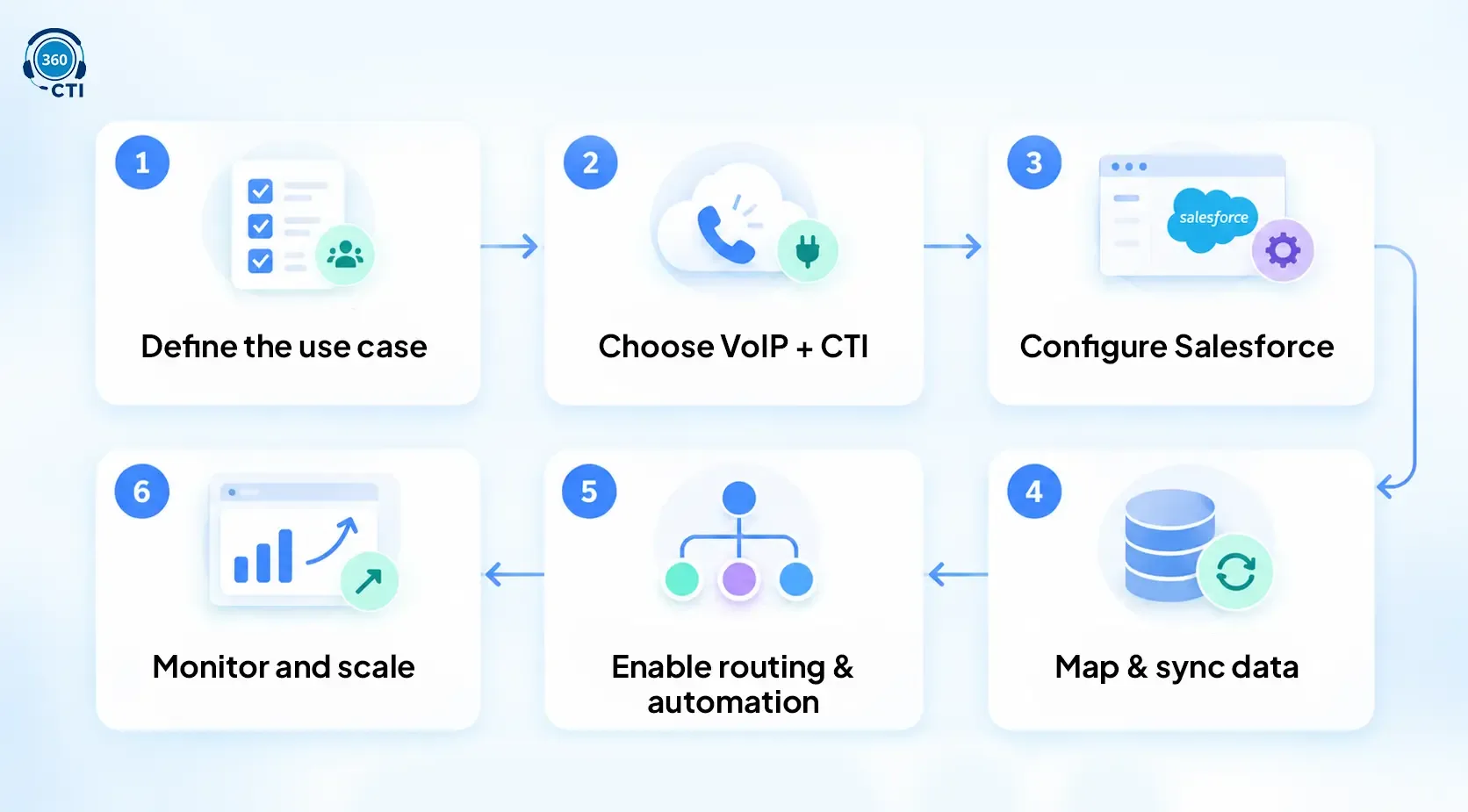
Step 1: Define Your Salesforce Call Center Use Case
Not every Salesforce call center setup has the same goal.
A sales team may need outbound calling, power dialing, call dispositions, and activity tracking. A support team may need inbound queues, IVR, screen pops, case creation, and escalation logic. A collections team may care about call recording, payment-sensitive workflows, and retry rules.
Start with the operational use case before choosing technology.
Ask these questions:
- Who will use the call center?
- Will the team handle inbound, outbound, or both?
- Which Salesforce objects matter most?
- Should calls create tasks, cases, leads, or opportunities?
- What call outcomes need to be tracked?
- Who needs access to recordings?
- Which metrics matter most to managers?
This step looks simple, but it prevents expensive rework later.
For example, if your support team needs IVR and case-based routing, a basic click-to-call setup won’t be enough. If your sales team needs high-volume outbound calling, your setup should support call queues, dispositions, follow-ups, and rep-level reporting.
A good Salesforce call center integration starts with the workflow, not the phone system.
Step 2: Pick the Right VoIP Provider With Salesforce CTI Support
Your VoIP provider handles the voice connection. Salesforce handles CRM data. CTI connects the two.
That means your provider should support more than internet calling. It should work with a trusted Salesforce CTI adapter or AppExchange package that brings call controls, screen pop, and activity logging into Salesforce.
Before you choose a provider, check whether it supports:
- Open CTI compatibility
- A Salesforce softphone or embedded dialer
- Click-to-dial
- Screen pop
- Automatic call logging
- Call recordings
- Call disposition tracking
- Inbound and outbound call handling
- IVR and routing
- Reporting inside Salesforce
- Real-time sync with Salesforce records
The right provider depends on your team size, call volume, routing complexity, and reporting needs.
If your team only needs light calling, a simple Salesforce phone integration may work. If your agents handle high call volume, customer escalations, or regulated conversations, you’ll likely need deeper CTI features.
VoIP Provider Evaluation Checklist
| Requirement | Why it matters |
|---|---|
| Open CTI support | Helps bring call controls into Salesforce |
| Click-to-dial | Saves reps from copying numbers manually |
| Screen pop | Shows customer context during inbound calls |
| Auto call logging | Keeps activity data complete |
| Call dispositions | Helps managers understand call outcomes |
| Recording links | Supports QA, training, and compliance |
| Routing support | Sends calls to the right team or agent |
| Salesforce reporting | Helps managers track performance from CRM data |
Step 3: Configure Salesforce for Telephony Integration
After choosing your VoIP or CTI solution, configure Salesforce so agents can manage calling from the CRM. There are two important setup areas to understand.
Open CTI
Open CTI is Salesforce’s browser-based framework for integrating third-party telephony systems with Salesforce. It allows call controls to appear inside Salesforce without requiring old desktop CTI adapters.
This matters because your agents shouldn’t have to jump between a phone app and Salesforce. The call experience should sit close to the record they’re working on.
With Open CTI, teams can support actions like:
- Placing calls from Salesforce
- Receiving inbound calls
- Showing caller information
- Searching or matching records
- Logging call activity
- Triggering workflows from call events
This is where Salesforce-telephony integration becomes practical. Agents can manage calls, view CRM records, log activity, and update outcomes without leaving Salesforce.
Softphone Layouts
Softphone layouts decide what agents see when a call comes in. For example, you can configure layouts so agents see:
- Caller name
- Account details
- Open cases
- Previous call history
- Related opportunities
- Quick actions
- Case creation options
This is where Salesforce CTI setup becomes practical.
A sales rep may need lead source, last activity, and opportunity stage. A support agent may need open cases, SLA status, and product details. A manager may need call history and escalation context.
The layout should match the role. Don’t show every field. Show what helps the agent act faster.
Step 4: Implement Data Mapping and Sync
A smooth Salesforce-integrated VoIP call center depends on clean data mapping.
This is where many teams get stuck.
The call connects, but the activity lands on the wrong record. The recording link gets stored in a field nobody uses. The disposition values don’t match reporting needs. Agents still add notes manually because the call log doesn’t capture enough detail.
Avoid that. Before go-live, define exactly how call data should move between the phone system and Salesforce.
Data mapping should cover both outbound and inbound calls. Outbound calls should attach to the right lead, contact, account, opportunity, or campaign record. Inbound calls should match the caller to the right customer record, case, or account history.
📌 DID YOU KNOW
Many Salesforce call center projects fail after go-live because call data is technically captured but not captured in the right fields. That means dashboards still look incomplete. Reps still add notes manually. Managers still ask for spreadsheets. The issue isn’t the phone system. It’s poor CRM mapping.
Step 5: Enable Agent Productivity With Routing and Automation
Once calling works inside Salesforce, the next step is making it easier for agents to act.
This is where routing, IVR, Flows, and automation help.
Call Routing
Routing decides where each call should go.
Basic routing sends calls to the next available agent. Advanced routing can use Salesforce data, team availability, skill, case priority, account owner, language, customer status, or department.
For example:
- VIP customers route to senior agents
- Open billing cases route to finance support
- Existing accounts route to account owners
- High-priority cases route to a priority queue
- Missed calls create urgent follow-up tasks
This is where Salesforce telephony becomes more valuable than a standalone phone system.
Your routing can use CRM context, not just phone menu inputs.
IVR and Self-Service
IVR helps customers choose the reason for their call before reaching an agent. When connected to Salesforce, IVR can support smarter routing and faster service.
For example, a caller can select billing, technical support, or sales. Salesforce context can then help route the call to the best team.
For deeper setup guidance, read this related guide on Salesforce IVR integration.
Salesforce Flows and Alerts
You can also use automation to reduce manual work after calls.
Examples include:
- Create a follow-up task after a missed call
- Send an alert for high-priority customer calls
- Update lead status after an outbound call
- Trigger a case escalation after repeated missed calls
- Route callbacks based on agent availability
- Create QA review tasks for selected calls
Some teams also use AI Voicebots for routine inbound or outbound calls. That can help answer common questions, qualify callers, or collect basic information before an agent joins.
Use automation carefully.
The goal is to reduce repetitive work, not create noisy alerts that agents ignore.
Step 6: Monitor, Optimize, and Scale
A Salesforce-integrated VoIP call center isn’t finished when the first call connects.
Go-live is the starting point.
You need to monitor call performance, agent adoption, data quality, and customer experience. Otherwise, the setup may work technically but fail operationally.
Track metrics such as:
- Call volume
- Average handle time
- First call resolution
- Missed calls
- Abandoned calls
- Call disposition trends
- Follow-up completion
- CSAT
- Agent activity
- Queue performance
Common Salesforce Call Center Integration Mistakes
Even a good Salesforce-integrated VoIP call center can underperform if the setup is rushed. Avoid these common mistakes:
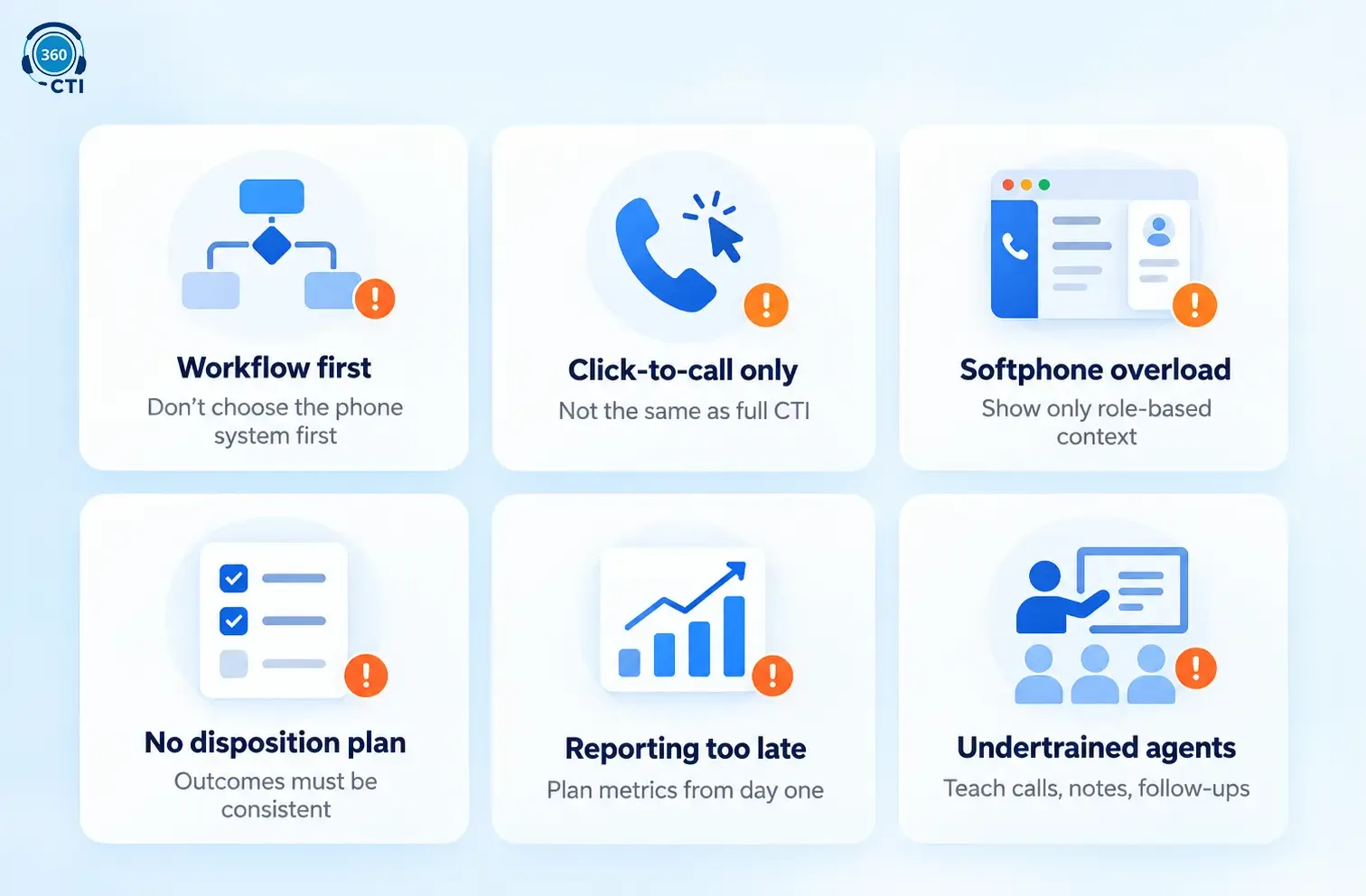
1. Choosing the Phone System Before Mapping the Workflow
Don’t start with the VoIP tool. Start with the agent workflow. Define who calls, which Salesforce record should open, what data should be logged, and which reports managers need.
2. Treating Click-to-Call as Full CTI
Click-to-call is useful, but it is not a complete Salesforce-telephony integration setup. A full call center workflow may also need screen pops, routing, call logging, dispositions, recordings, and reporting.
3. Ignoring Softphone Layouts
Agents need the right context during a call, not every field in Salesforce. Keep softphone layouts role-based, clean, and focused on the information agents need to act quickly.
4. Skipping Call Disposition Planning
Call dispositions should be clear and reportable. If every agent uses different outcomes, managers won’t get useful insights from call reports.
5. Leaving Reporting Until the End
Decide your reporting needs before setup. Call volume, missed calls, average handle time, dispositions, and follow-up completion should be planned from day one.
6. Undertraining Agents
Agents should know how to answer calls, use screen pop, log notes, select dispositions, handle missed calls, and create follow-ups. Poor training can make even a strong CTI setup fail.
Conclusion
A Salesforce-integrated VoIP call center helps your team bring calls, customer context, call logs, routing, and reporting into Salesforce.
The real value comes from setup quality. Define your use case, choose the right VoIP and CTI support, configure Salesforce properly, map call data clearly, and keep reporting in mind from the start.
When done right, Salesforce call center integration gives agents faster context, managers cleaner visibility, and customers a better calling experience.