
📋 BLOG SUMMARY
Salesforce Service Cloud CTI integration connects business calling with Service Cloud, helping support teams manage inbound calls, access case records, and automate call routing without custom development. This guide covers softphone configuration, case matching, IVR workflows, compliance requirements, and common setup mistakes to help businesses build a more efficient customer support experience.
A support agent picks up a call, and the case is already open on the right side of their screen. Sounds simple. Most teams spend weeks fighting with sandboxes, Apex classes, and half-documented adapter settings to get there. Salesforce Service Cloud CTI integration is supposed to save agents time, not eat three sprints of your admin’s calendar. And here’s the part nobody tells you upfront: you don’t need a developer for most of it.
This guide walks through what a Service Cloud CTI setup actually requires, where the softphone connects to case data, how to build routing without code, and the five mistakes that show up in almost every first attempt.
Want Callers Routed to the Right Agent Every Time?
AI call routing connects callers to the right agents based on skills and availability.
See Call Routing →What Salesforce Service Cloud CTI Integration Actually Involves
At the core, it’s the same idea as any CTI setup: a phone system talks to Salesforce so agents can make and receive calls without leaving the console. But salesforce service cloud CTI carries a few specific requirements that a generic sales-side calling tool doesn’t.
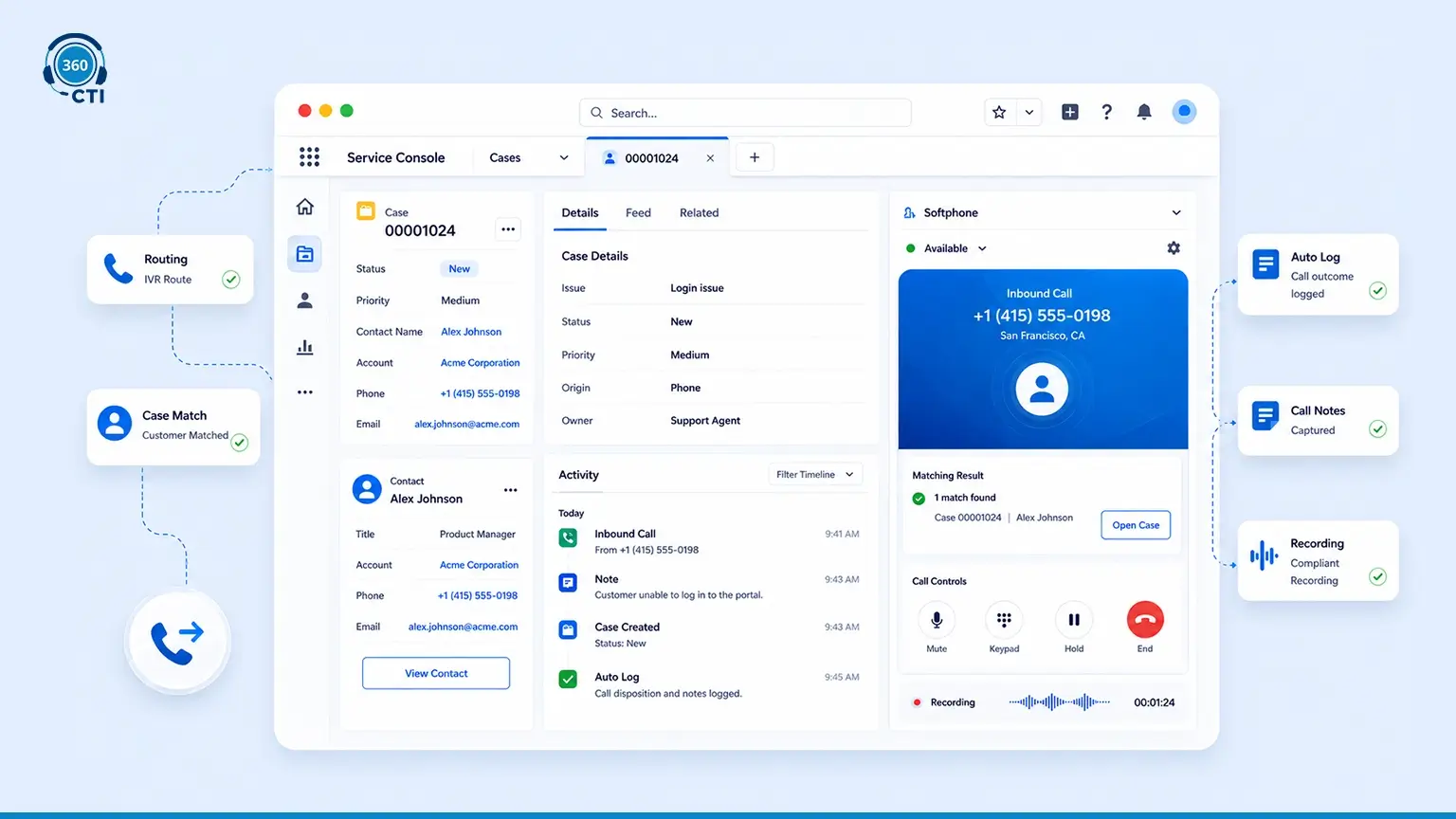
Service Cloud runs on cases, not just leads and opportunities. So the CTI layer has to know how to match an inbound number to an existing case, decide whether to open a new one, and log the outcome back to the right record without an agent doing it manually. It also needs to sit inside the Service Console, not a separate Lightning app, because that’s where support teams actually work.
Salesforce’s own documentation on the Open CTI framework covers the base API for building or connecting a softphone. What it doesn’t cover is routing logic, IVR, or compliance recording. Those get bolted on separately, which is usually where the “custom development” myth comes from. A native app like 360 CTI ships that logic pre-built, so you’re configuring settings instead of writing Apex triggers.
How the Softphone Connects to Service Cloud Case Records
This is the part that decides whether agents trust the tool or fight it. When a call comes in, the softphone checks the caller ID against Salesforce contact and account records. If there’s a match, it can pull up the most recent open case, or create a new one if nothing’s active.
Three things determine how well this works:
- Clean phone number formatting on contact and account records (missing country codes are the single biggest cause of failed matches)
- Whether the matching logic checks custom phone fields, not just the standard ones
- What happens on a tie, meaning multiple cases open for the same contact
Curious How Voice Fits Into the Bigger Picture?
Explore how Salesforce VoIP integration connects voice calls, CRM data, and support workflows.
Read the Guide →Setting Up Routing Rules Based on Service Cloud Data (Owner, Queue, Case Type)
Here’s where CTI for service cloud starts to look different from a basic sales dialer. Support routing has to account for case ownership, queue assignment, case type, and sometimes customer tier, all at once.
A workable starting structure looks like this:
| Scenario | Routing Logic |
|---|---|
| Existing case, known owner | Route to case owner if online |
| Existing case, owner offline | Route to backup queue by case type |
| No existing case | Route to general support queue by department IVR selection |
| Escalated case | Route to the assigned escalation owner or team lead |
None of this requires custom code in a native CTI app. It’s config: skill tags on agents, queue assignments in Salesforce, and routing rules that reference standard and custom case fields. Salesforce’s own Service Cloud Voice documentation notes that routing for their native voice product depends on Amazon Connect for the underlying IVR and queue logic. A native app configures that routing directly inside Salesforce, without a separate telephony console to manage.
Configuring IVR Flows That Write Outcomes to Case Records Automatically
IVR in a Service Cloud context isn’t just “press 1 for support.” It’s the first data point in the case. What did the caller select? What department did they choose? Did they hang up mid-menu?
A properly configured IVR flow should write these outcomes back to the case or the call log automatically. That includes:
- The IVR path the caller took
- The queue or department selected
- Whether the call was abandoned in the IVR
- Any self-service resolution, if the IVR offered one
This matters more than most teams expect. Support managers reviewing case volume by department, or auditing why a customer waited, need this data attached to the record, not buried in a separate telephony report they have to cross-reference manually.
Text-to-speech configuration (male or female voice options in most native apps) lets you build and edit these menus without needing a voice actor or a change request to your telephony vendor every time a script needs updating.
Compliance Recording in Service Cloud: What to Set Up Before Go-Live
Call recording inside Service Cloud brings its own set of decisions, and getting them wrong is expensive to fix later.
Before go-live, confirm:
- Whether recording is required for all calls or only specific queues (support recording rules often differ from sales)
- Consent handling for two-party consent states or countries, including any required disclosure message
- Retention period for recordings and transcripts, tied to your data governance policy
- Access controls, meaning which roles can play back, download, or delete recordings
- Whether recordings need to attach to the case record or live in a separate storage location with a case reference
Did you know Salesforce’s standard Business Associate Agreement does not automatically extend to AppExchange telephony apps? That’s a gap most teams discover only after a recording is already sitting in the system. If your support team handles healthcare-related calls, confirm BAA coverage directly with your CTI vendor before recording a single call. Don’t assume it’s covered because Salesforce itself has one.
📌 DID YOU KNOW
Salesforce's standard Business Associate Agreement does not automatically extend to AppExchange telephony apps. That's a gap most teams discover only after a recording is already sitting in the system. If your support team handles healthcare-related calls, confirm BAA coverage directly with your CTI vendor before recording a single call. Don't assume it's covered because Salesforce itself has one.
The Five Things Most Service Cloud CTI Setups Miss on the First Try
- They configure routing but skip fallback rules. What happens when every agent in a queue is offline? If there’s no fallback, calls just ring out.
- They don’t test the phone-to-case matching with dirty data. Production data is never as clean as sandbox data. Test with real, messy contact records before go-live.
- They treat compliance as a launch-day checkbox instead of a design input. Recording and consent rules should shape the queue structure, not get bolted on after.
- They underestimate agent training time on the console layout. A softphone that works technically but confuses agents visually still fails adoption.
- They don’t plan for case reassignment mid-call. If a call gets transferred, does the case ownership update? Most teams find out the answer is “no” only after a customer complains about being asked the same question twice.
Getting these right the first time is mostly about sequencing. Compliance and routing decisions come before configuration, not after. Most teams treat cti for service cloud as a one-time install, but it’s closer to an ongoing configuration habit, revisited every time a queue structure or compliance requirement changes.
Bringing It Together
Good service cloud telephony setup work looks boring from the outside: clean data, tested rules, a compliance checklist ticked off before anyone answers a live call. That’s the point.
A working salesforce service cloud cti integration doesn’t need a development sprint. It needs the right sequence: clean phone data, call routing rules built around your actual queue structure, IVR that writes back to cases, and compliance settings locked in before the first live call. Native apps built specifically for Salesforce, like 360 CTI, handle the matching, routing, and recording logic out of the box, which is what turns this from a build project into a configuration project.